In development Now available
DAWFORMA
Shape your workspace.
The Pro Tools look in a Logic world.
Overview
The Pro Tools look, inside Logic Pro.
DAWFORMA restyles Logic Pro's track headers, mixer and transport with a theme modeled on Pro Tools. Changes apply while Logic is running, and Restore Logic returns everything to stock.
Setup
Install once.
-
Install the integration
With Logic closed, open DAWFORMA and click Install / Update Integration.
-
Apply a theme
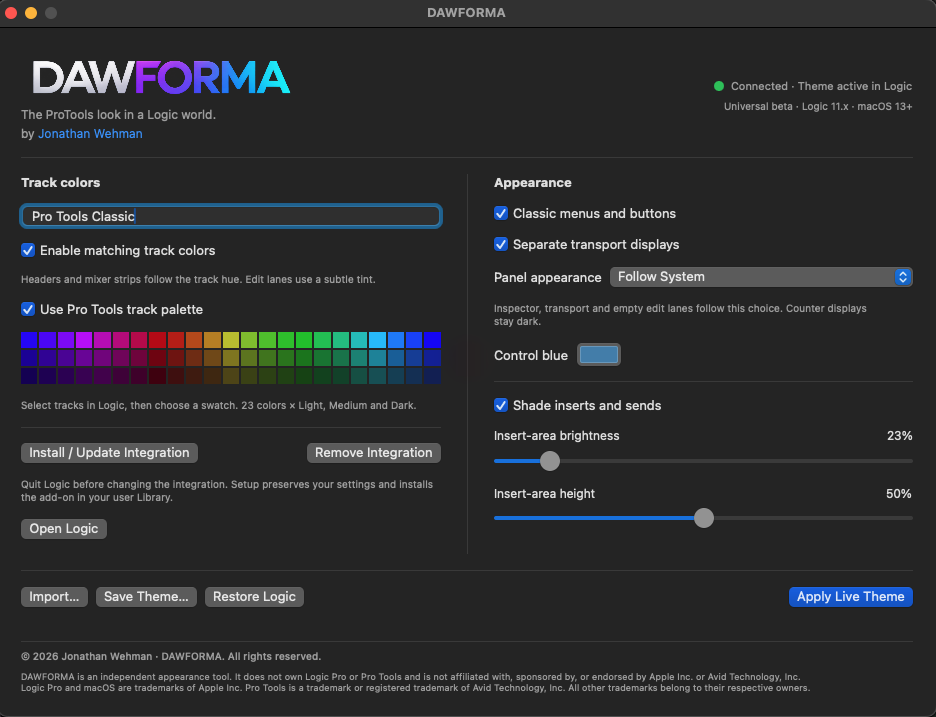
Choose a theme, such as Pro Tools Classic, and click Apply Live Theme.
-
Close the app
The theme stays active in Logic, including after a restart. Open DAWFORMA again only to change it.
Almost zero footprint. The integration runs inside Logic, with no background app and no polling timer. The download is 2.2 MB.
Features
What you can change
Public beta · Logic Pro 11.2.2 and newer · macOS 26 and newer · Requirements
Track colors
- Themes
- Apply a theme such as Pro Tools Classic while Logic is running. Save your own, import others, and restore Logic's stock look at any time.
- Matching track colors
- Track headers and mixer strips follow each track's color. Edit lanes take a subtle tint.
- Pro Tools palette
- 23 colors in light, medium and dark. Select tracks in Logic, then click a swatch.
Appearance
- Panel appearance
- Follow System, Light or Dark for the inspector, transport and empty edit lanes. Counter displays stay dark.
- Inserts and sends
- Optional shading, with adjustable brightness and height.
- Control blue
- Sets the blue used for selected buttons.
- Classic options
- Classic menus and buttons, and separate transport displays.
- Integration
- Install, update or remove it from the app. Your settings are kept, and the add-on installs to your user Library.
Requirements
Compatibility
DAWFORMA is built for Apple silicon Macs running macOS 26 or newer and Logic Pro 11.2.2 or newer. Older Intel Macs should work fine too, they just aren’t officially supported.
Status
Public beta
The DAWFORMA public beta is open. Sign up below and the download link will be emailed to you.
Public beta
Not open yet. Follow @jonathanwehman on Instagram for the announcement.
Follow on InstagramJoin the beta
Fill out the form and we’ll email you the download link.
You're in. Check your email.
We just emailed you the download link. If it isn’t there in a few minutes, check your spam folder.
Download DAWFORMABefore you install
- Unzip the download and open DAWFORMA. macOS will say it can't verify the app: click Done, then go to System Settings → Privacy & Security and click Open Anyway. You only do this once.
- Quit Logic, then click Install / Update Integration in DAWFORMA. This is a one-time step.
- Use an empty project for your first session.
- The Beta Guide in the download covers installation, testing and removal.

Download
DAWFORMA
Release notes